AI se photo edit kaise kare? अगर आपको अभी, इसी वक़्त एक photo AI से edit करनी है तो सबसे तेज़ रास्ता ये है — फ़ोन में पहले से मौजूद Google Photos खोलिए, photo पर Edit दबाइए और Magic Editor चुनिए। Background हटाना, कोई इंसान या object मिटाना, आसमान बदलना — ये सब वहीं हो जाता है, कोई नया app install किए बिना। इससे ज़्यादा control चाहिए तो Google Gemini app में photo upload करके हिंदी में लिख दीजिए कि क्या बदलना है। और जिन्हें सचमुच साफ़, बिना watermark वाली free editing चाहिए, उनके लिए आज भी Snapseed सबसे भरोसेमंद है।
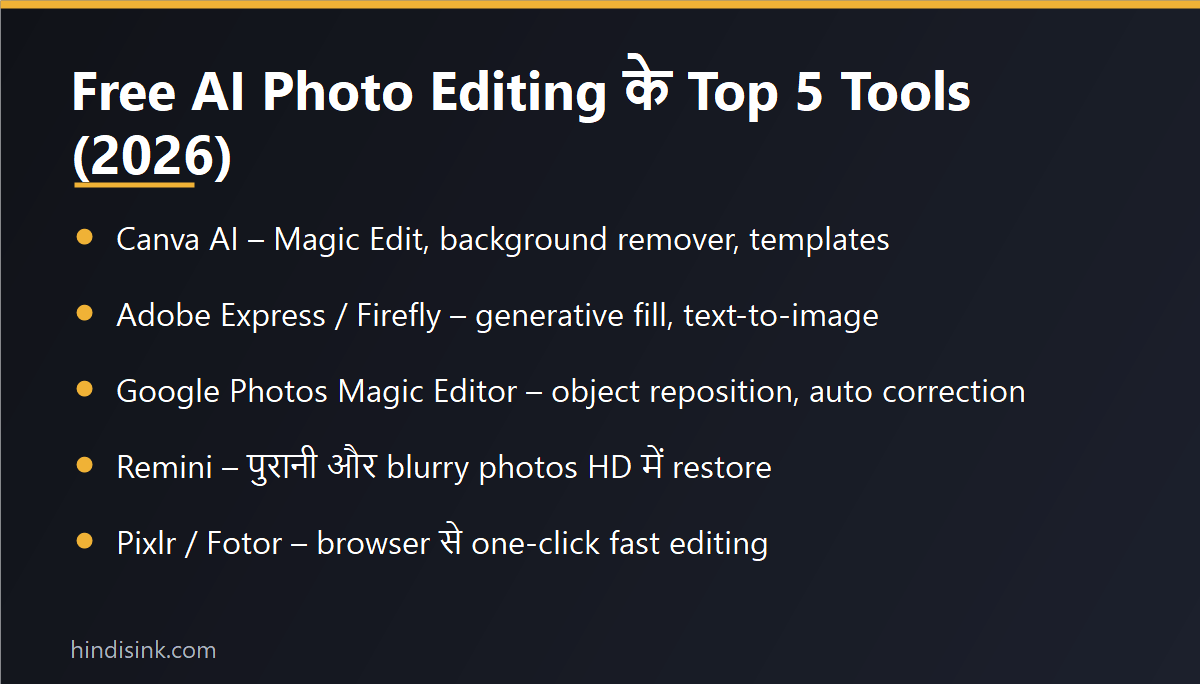
नीचे हर tool के लिए यही लिखा है — कहाँ मिलेगा, exact button कहाँ दबाना है, free में कितना मिलता है और कहाँ जाकर वो रुक जाता है। जिन apps के नाम यहाँ दिए हैं, वो सब Play Store पर इन्हीं नामों से मौजूद हैं: Google Gemini, Google Photos, Meta AI, Snapseed, Canva, Remini, Adobe Express और Pixlr।
Google Photos Ke Magic Editor Se Photo Edit Kaise Kare
ज़्यादातर Android फ़ोन में Google Photos पहले से होता है, इसलिए शुरुआत यहीं से कीजिए।
- Google Photos खोलिए और जिस photo को edit करना है उस पर tap कीजिए।
- नीचे Edit (pencil वाला icon) दबाइए।
- बाईं तरफ़ नीचे Magic Editor का button दबाइए।
- अब जिस चीज़ को हटाना या हिलाना है, उस पर उँगली से circle बनाइए या tap कीजिए — फिर erase, move या resize चुनिए।
- ऊपर दिए preset options (जैसे sky या background वाले suggestion) से पूरा माहौल बदला जा सकता है।
- पसंद आने पर Save copy दबाइए — original photo वैसी की वैसी रहती है।
ईमानदार limitation: Magic Editor free account पर unlimited नहीं है — महीने में कितने AI edits save किए जा सकते हैं, इसकी एक limit रहती है और Google One वालों को ज़्यादा मिलते हैं। ये limit Google समय-समय पर बदलता रहता है, इसलिए कोई पक्का आँकड़ा मान कर मत चलिए; app खुद आपको बता देता है कि कितने बचे हैं। दूसरी बात — Magic Editor पुराने या बहुत कम RAM वाले फ़ोन पर नहीं आता, ऐसे में वहाँ सिर्फ़ normal Edit tools दिखेंगे।
Google Gemini Se Photo Edit Kaise Kare (Prompt Me Kya Likhe)
Gemini का फ़ायदा ये है कि आपको tool ढूँढना ही नहीं पड़ता — आप बस हिंदी में बोल/लिख देते हैं कि क्या चाहिए।
- Play Store से Google Gemini app install कीजिए और Google account से sign in कीजिए।
- Chat box में + दबाकर gallery से photo चुनिए।
- साथ में साफ़-साफ़ instruction लिखिए, और यही सबसे ज़रूरी हिस्सा है।
काम करने वाले prompts कुछ ऐसे होते हैं:
- “इस photo का background हटाकर plain सफ़ेद कर दो, चेहरा और कपड़े बिल्कुल वैसे ही रहें”
- “पीछे खड़े आदमी को हटा दो और उस जगह को दीवार जैसा भर दो”
- “इसे passport size जैसा साफ़ light में बदलो, shadow कम करो”
- “शर्ट का रंग नीला कर दो, बाक़ी कुछ मत बदलो”
“photo अच्छी बना दो” जैसा prompt सबसे बेकार result देता है, क्योंकि AI को पता ही नहीं कि आपके लिए “अच्छी” क्या है। जो बदलना है वो लिखिए और जो नहीं बदलना, वो भी लिखिए — यही एक लाइन result दोगुना बेहतर कर देती है।
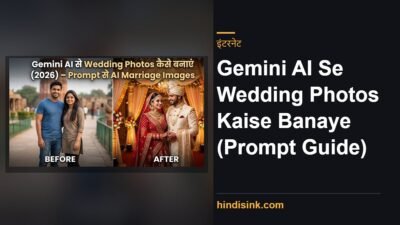
ईमानदार limitation: free account पर रोज़ कितनी image requests चलेंगी इसकी limit होती है और वो बदलती रहती है। साथ ही चेहरे की बारीक़ detail कई बार बदल जाती है — यानी किसी की photo “सुधारते” वक़्त वो थोड़ा अलग इंसान लगने लगे, ऐसा होता है। Documents, ID या किसी official काम की photo पर AI edit लगाना ही नहीं चाहिए। Gemini से wedding और portrait style images बनाने के तैयार prompts इस prompt गाइड में दिए हैं।
Meta AI Se Photo Edit – Instagram Aur WhatsApp Ke Andar
Meta AI अलग app के रूप में भी Play Store पर है, लेकिन ज़्यादातर लोगों के लिए इसका आसान रास्ता Instagram या WhatsApp के अंदर से है — क्योंकि वो पहले से installed हैं।
Instagram में story या post बनाते वक़्त AI वाला edit option दिखता है, जहाँ photo का background या पूरा look बदला जा सकता है। WhatsApp में Meta AI की chat खोलकर photo भेजिए और लिख दीजिए कि क्या बदलना है। पूरा step-by-step हमने Instagram Meta AI से photo edit करने वाली गाइड में अलग से लिखा है।
ईमानदार limitation: Meta AI के features हर देश, हर भाषा और हर account पर एक साथ नहीं आते — किसी के Instagram में option दिखता है, किसी के नहीं। दूसरी बात ये कि edit की गई image अक्सर Meta के platform के अंदर ही अच्छी तरह काम करती है; high-resolution फ़ाइल चाहिए हो तो बाक़ी tools बेहतर रहते हैं।
Snapseed – Free Me Sabse Saaf Editing, Bina Watermark
Snapseed में “AI” का ढोल नहीं पीटा जाता, लेकिन असल काम के लिए ये अब भी सबसे भरोसेमंद free app है। Google का ही app है, Play Store पर पूरी तरह free मिलता है, export पर कोई watermark नहीं लगता और न ही हर click पर ad आता है।
सबसे ज़्यादा काम आने वाले तीन tools:
- Healing — photo से छोटी ग़ैरज़रूरी चीज़ें (तार, दाग़, पीछे का कूड़ा) उँगली फेरकर मिटा देता है।
- Selective — सिर्फ़ चेहरे या सिर्फ़ आसमान की brightness बदलने के लिए, बाक़ी photo को छुए बिना।
- Curves — असली photographers वाला control; एक बार समझ आ गया तो filter की ज़रूरत ही नहीं पड़ती।
ईमानदार limitation: Snapseed एक click में background नहीं बदलता और न ही prompt समझता है — यहाँ आपको ख़ुद हाथ चलाना पड़ता है। सीखने में शुरुआत के दो-तीन दिन लगते हैं, उसके बाद यही सबसे तेज़ पड़ता है। बिल्कुल शुरुआत से सीखनी हो तो फोटो एडिट कैसे करें वाली बेसिक गाइड पहले पढ़ लीजिए।
Canva Se AI Photo Edit – Kya Free Hai Aur Kya Nahi
Canva उन लोगों के लिए है जिन्हें सिर्फ़ photo नहीं, पूरा design चाहिए — thumbnail, poster, Instagram post, resume। Photo upload कीजिए, ऊपर Edit image दबाइए और वहाँ AI वाले options मिल जाते हैं।
लेकिन यहाँ साफ़ बात समझ लीजिए, क्योंकि यही सबसे बड़ा confusion है: Canva में Background Remover और Magic Eraser जैसे असली काम के AI tools Pro plan में आते हैं। Free account में templates, text, cropping, filters, basic adjustments और थोड़े से AI credits मिलते हैं। यानी “Canva से free में background हटा दो” वाले videos अक्सर Pro account पर बने होते हैं।
Canva की design skill को कमाई में बदलने का रास्ता हमने Canva से पैसे कैसे कमाएं वाली पोस्ट में विस्तार से लिखा है।
Purani, Blurry Ya Dhundhli Photo Sudharne Ke Liye
अगर आपकी ज़रूरत background बदलना नहीं बल्कि पुरानी photo साफ़ करनी है, तो अलग tools चाहिए।
- Remini — पुरानी और धुंधली photos के चेहरे साफ़ करने में सबसे चर्चित। Free version में रोज़ गिने-चुने enhances मिलते हैं और बीच में ads आते हैं। ध्यान रहे, Remini चेहरा “साफ़” नहीं करता, वो नई detail बना देता है — इसलिए कभी-कभी चेहरा असली से थोड़ा अलग लगता है।
- Adobe Express — Adobe के AI features browser और app दोनों में। Free plan में generative credits सीमित होते हैं, ख़त्म होने पर उन features पर ताला लग जाता है।
- Pixlr — बिना app install किए browser से जल्दी काम निपटाने के लिए ठीक। Free में ads रहते हैं और high-resolution export पर पाबंदी होती है।
सिर्फ़ background हटाना हो तो उसका अलग और छोटा रास्ता फोटो का background free में हटाने वाली पोस्ट में है। Photo को video में बदलना हो तो AI से वीडियो कैसे बनाएं देखिए।
Free Vs Paid: Kis Tool Me Kya Rukta Hai
हर tool का free plan है, लेकिन हर एक अलग जगह जाकर रुकता है। नीचे वही असली रुकावटें हैं — exact numbers जानबूझकर नहीं लिखे, क्योंकि कंपनियाँ इन्हें बदलती रहती हैं और app के अंदर current limit ख़ुद दिख जाती है।
| Tool | Free me kya milta hai | Free me kahan rukta hai |
| Google Photos (Magic Editor) | Erase, move, background और sky वाले AI edits | AI edit save करने की monthly limit; पुराने फ़ोन पर option ही नहीं आता |
| Google Gemini | Photo upload करके हिंदी prompt से editing | रोज़ की request limit; चेहरे की detail बदल जाती है |
| Meta AI | Instagram/WhatsApp के अंदर ही AI edit | Features हर region और हर account पर नहीं; resolution सीमित |
| Snapseed | पूरा app free, कोई watermark नहीं, कोई ad नहीं | कोई one-click AI नहीं, सब manual |
| Canva | Templates, text, crop, filters, थोड़े AI credits | Background Remover और Magic Eraser Pro में |
| Remini | पुरानी photo का face enhance | रोज़ गिनी-चुनी free enhances + ads |
| Adobe Express / Pixlr | Browser से quick AI editing | Generative credits और high-res export पर रोक |
Ye 5 Galtiyan Mat Kijiye
- Original photo पर सीधे save करना — हमेशा “Save as copy” चुनिए। AI edit वापस नहीं होता।
- ID और documents पर AI लगाना — Aadhaar, PAN, passport या किसी form की photo पर AI edit करना नहीं चाहिए; कई जगह ये reject होती है।
- WhatsApp से भेजी हुई photo edit करना — वो पहले ही compress हो चुकी होती है, इसलिए AI के पास काम करने लायक detail ही नहीं बचती। Original फ़ाइल लीजिए।
- चेहरे पर ज़्यादा smoothing — त्वचा plastic जैसी दिखने लगती है और photo नक़ली लगती है। Enhance हमेशा थोड़ा कम रखिए।
- अनजान website पर photo upload करना — “free AI editor” वाली random साइटों पर अपनी और परिवार की photos मत डालिए। Play Store वाले जाने-पहचाने apps ही सुरक्षित रास्ता हैं।
अक्सर पूछे जाने वाले सवाल
AI se photo edit kaise kare free me?
Google Photos खोलिए → photo पर Edit → Magic Editor। ये सबसे तेज़ free तरीका है और अलग app install नहीं करना पड़ता। Prompt लिखकर edit करना हो तो Google Gemini app में photo upload कीजिए और हिंदी में बता दीजिए कि क्या बदलना है।
Google AI se photo edit kaise kare?
Google के दो रास्ते हैं — Google Photos का Magic Editor (button दबाकर) और Gemini app (लिखकर बताकर)। दोनों एक ही Google account पर चलते हैं। Snapseed भी Google का ही है, लेकिन वो manual editor है।
AI se photo edit karne ke liye prompt me kya likhe?
तीन चीज़ें लिखिए: क्या बदलना है, कैसा बनाना है, और क्या बिल्कुल नहीं बदलना। जैसे — “background हटाकर plain grey करो, चेहरा और कपड़े वैसे ही रहें”। “सुंदर बना दो” जैसे prompt से नतीजा हमेशा ख़राब आता है।
Best free AI photo editing app kaun sa hai?
एक “सबसे अच्छा” app नहीं होता। रोज़मर्रा के edits के लिए Google Photos, बारीक़ और watermark-free काम के लिए Snapseed, design के लिए Canva और पुरानी photo सुधारने के लिए Remini — अपनी ज़रूरत के हिसाब से चुनिए।
Kya AI photo editing me watermark aata hai?
Snapseed और Google Photos में नहीं आता। कई दूसरे free AI editors export पर अपना logo लगा देते हैं या high-resolution download रोक देते हैं — इसलिए save करने से पहले preview ज़रूर देख लीजिए।
Kya purani dhundhli photo AI se theek ho jati hai?
काफ़ी हद तक हाँ, लेकिन ध्यान रखिए कि AI खोई हुई detail वापस नहीं लाता — वो नई detail बनाकर भर देता है। इसलिए पुरानी तस्वीरों में चेहरा कभी-कभी असली से थोड़ा अलग निकल आता है। पारिवारिक पुरानी photos के लिए original फ़ाइल हमेशा संभाल कर रखिए।
Kya bina app ke, browser se AI photo edit ho sakta hai?
हाँ। Pixlr और Adobe Express दोनों browser में चलते हैं, और Gemini भी वेबसाइट से इस्तेमाल हो जाता है। कम storage वाले फ़ोन के लिए ये अच्छा रास्ता है, बस free plan में ads और export की पाबंदियाँ रहती हैं।
इन्हें भी पढ़ें
AI से पैसे कैसे कमाएं – 9 तरीके
Best Free AI Tools List – Content, Design और Productivity
ChatGPT Kaise Use Kare Hindi Me
फोटो का size कैसे कम करें
Social Media:
Facebook | Instagram | Youtube |